KDP Wedding Guest Book Interior: A Practical Resource for Publishers and Planners
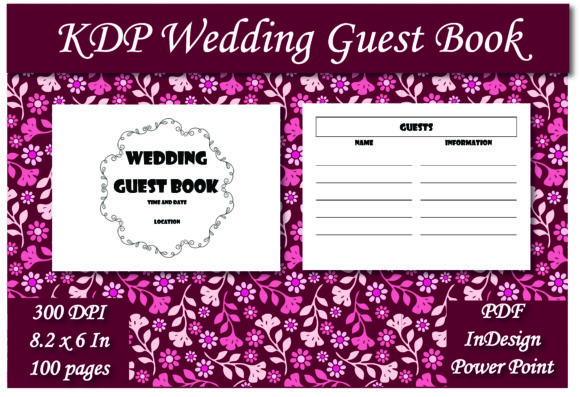
Creating a memorable guest book for Amazon KDP starts with a functional, well-designed interior. The KDP Wedding Guest Book Interior is specifically formatted to streamline the publishing process for low-content books while providing end-users with a practical tool for capturing wedding memories. This resource typically includes 100 pages of lined guest list entries, optimized for the popular 8.2 x 6 inch trim size. Rather than forcing creators to build layouts from scratch, this pre-formatted solution offers immediate access to professional-grade files in PDF, InDesign, and PowerPoint formats. This versatility allows both seasoned self-publishers and first-time creators to produce a high-quality product that meets specific market demands without extensive graphic design experience.
Real-World Applications for Self-Publishers
For authors and entrepreneurs building a portfolio of wedding stationery on Amazon, consistency and speed are often more valuable than bespoke artistry for every single title. The primary use case here is inventory expansion. When you have identified a profitable niche within the wedding category, such as rustic boho or modern minimalist themes, the ability to swap out covers while maintaining a reliable, tested interior structure significantly reduces production time. The included InDesign file serves as a master template for those who want to adjust margins, change fonts, or add custom branding elements like a subtle watermark or header logo. This level of customization ensures that even if multiple publishers utilize the same base asset, the final products remain distinct enough to avoid duplicate content flags while satisfying diverse aesthetic preferences.
Newer KDP publishers often struggle with the technical specifications required for print-on-demand success. Bleed settings, safe zones, and gutter margins can be confusing when setting up an 8.2 x 6 inch book. Using a pre-validated KDP Wedding Guest Book Interior eliminates the guesswork associated with formatting errors. The PDF option acts as a "print-ready" safety net for users who do not own Adobe Creative Cloud subscriptions. They can upload the file directly to KDP with confidence that the lined sections align correctly and the text won't be trimmed off during manufacturing. This practical application transforms a complex technical hurdle into a simple upload task, allowing new sellers to focus their energy on keyword research, cover design, and marketing rather than troubleshooting layout issues.
Bridging the Gap for Event Professionals
Beyond self-publishing, this digital asset holds significant value for wedding planners, venue coordinators, and independent stationery designers who operate outside the Amazon ecosystem. Many event professionals seek cost-effective ways to offer branded merchandise or complimentary gifts to clients without paying premium prices at commercial printers. With the PowerPoint and InDesign source files, a planner can easily modify the interior to include the couple’s names, wedding date, or even a personalized welcome message on the first page. They can then export a high-resolution PDF and take it to a local print shop for a small batch run. This scenario highlights the flexibility of owning editable source files versus just a static PDF; it turns a mass-market digital product into a bespoke client deliverable.
Venue owners and rental companies also find utility in these interiors for creating standardized logbooks. Instead of using generic spiral-bound notebooks that look unprofessional, venues can produce elegant, hardbound guest books that match their interior decor. The 8.2 x 6 inch size is particularly advantageous in this context because it is compact enough to fit on narrow entryway tables or podiums but large enough to accommodate two guests signing simultaneously. The 100-page count provides ample capacity for medium-to-large weddings without adding excessive bulk or weight. For businesses managing multiple events per season, having a repeatable, editable template means they can quickly generate fresh books for each weekend, ensuring a consistent brand experience for every couple walking through their doors.
Understanding the Format Versatility
The inclusion of three distinct file types addresses different workflows and skill levels, which is a critical consideration before purchase. The PDF is the universal standard, best for users who need a finished product immediately and have no intention of altering the layout. It guarantees that what you see is exactly what prints, preserving line weights and spacing across all devices and operating systems. However, its limitation is rigidity; you cannot move elements or change text without specialized editing software.
The PowerPoint file serves as an accessible middle ground. Many users are already proficient in PowerPoint for business presentations but lack design training. This format allows for drag-and-drop customization, font changes, and image insertion using familiar tools. It is ideal for DIY brides or small business owners who want personalization without the learning curve of professional design software. Keep in mind that PowerPoint handles color profiles differently than print-native applications, so users should verify CMYK conversion if color accuracy is paramount.
The InDesign file is the industry standard for professional publishing. It offers granular control over typography, master pages, and paragraph styles. This is the preferred format for serious KDP publishers who plan to create a series of related journals or guest books. It allows for global changes across all 100 pages instantly—such as adjusting line height or repositioning page numbers—saving hours of manual labor. The trade-off is the requirement of an active Adobe subscription and a baseline understanding of desktop publishing principles.
Strategic Considerations Before Implementation
While the convenience of a pre-made KDP Wedding Guest Book Interior is undeniable, successful implementation requires strategic thinking regarding market saturation. Because these templates are accessible to many, relying solely on the default layout can lead to products that blend into the background. Successful users treat the template as a foundation, not a final destination. Adding unique value propositions, such as including prompts for guests to share marriage advice, space for polaroid photos, or QR codes linking to a digital registry, can differentiate a listing even when the base interior is shared. The 8.2 x 6 inch dimension is non-standard compared to the ubiquitous 8.5 x 11 or 6 x 9 sizes, which can actually be a competitive advantage; it signals a premium, intentional design choice rather than a generic notebook, but it also requires careful keyword targeting to reach buyers specifically looking for this trim size.
Quality assurance remains the user's responsibility regardless of the file source. Before publishing or printing in bulk, always order a physical proof. Screen resolution does not always translate perfectly to paper, especially with lined interiors where gray tones can sometimes appear too dark or too faint depending on the printer's calibration. Checking the binding margin is equally crucial; with 100 pages, the gutter needs to be sufficient so guests aren't writing into the spine crease. The provided templates should account for this, but verifying the physical usability ensures positive reviews and reduces returns. Ultimately, this resource is a powerful accelerator for production, but the human element of curation, customization, and quality verification is what transforms a digital file into a cherished wedding keepsake or a profitable KDP asset.