LinkedIn Posts Planner - KDP Interior: A Practical Guide to Quality and Customization
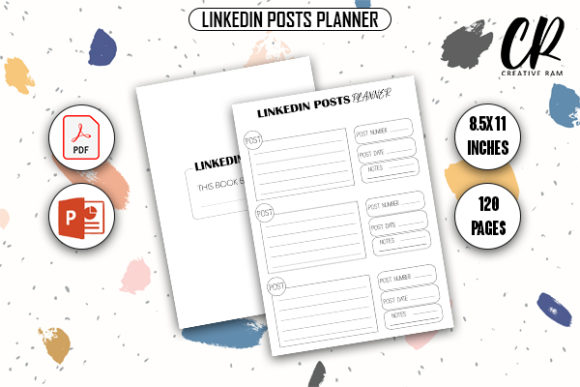
Creating a successful low-content or medium-content book on Amazon KDP requires more than just uploading a file; it demands a product that solves a specific problem for a targeted audience. The LinkedIn Posts Planner - KDP Interior is designed specifically for professionals, marketers, and content creators who need to organize their social media strategy offline. Unlike generic planners, this interior focuses on the unique structure of professional networking content, including hooks, value propositions, calls to action, and engagement tracking. For publishers and creators looking to enter this niche, understanding the technical specifications and common pitfalls of this 8.5″ x 11″, 120-page template is essential for avoiding costly printing errors and ensuring customer satisfaction.
Understanding the Technical Specifications and Bleed Requirements
One of the most frequent issues new KDP publishers face involves misunderstanding bleed settings. This LinkedIn Posts Planner - KDP Interior is specified as "Bleed With Bleed," which fundamentally changes how you must prepare your manuscript. A common mistake is treating a bleed file the same as a no-bleed file. When a planner includes bleed, the design elements extend beyond the final trim line. If you upload this PDF without accounting for the extra 0.125 inches on the top, bottom, and outside edges, Amazon’s automated review system will likely reject your file, or worse, print it with unintended white borders or cropped content.
Before uploading, always verify that your document setup matches the 8.5″ x 11″ trim size plus the required bleed allowance. The provided high-quality print-ready PDF should already be formatted correctly, but if you are modifying the source files, you must maintain these dimensions. Changing the page size in PowerPoint or another editor without adjusting the bleed margins can ruin the alignment of writing spaces and checkboxes. Always preview your file using the KDP Previewer tool to ensure that all critical text and functional planning areas remain within the safe zone, typically 0.375 inches from the trimmed edge for bleed books.
Evaluating Content Relevance Over Generic Templates
A significant error in the KDP space is assuming that any planner labeled "social media" will sell. LinkedIn users have distinct needs compared to Instagram or TikTok creators. They focus on thought leadership, B2B lead generation, and professional storytelling rather than visual aesthetics or viral trends. When evaluating this LinkedIn Posts Planner - KDP Interior, check whether the internal layout actually supports these goals. Does it include sections for drafting article ideas, tracking connection requests, or noting follow-up tasks?
If you customize the PPTX source files, avoid the temptation to fill pages with excessive decorative elements that reduce usability. Professionals buying this planner want functional whitespace for brainstorming and structured tables for tracking metrics. Over-designing the interior can make the book feel cluttered and less practical. A better approach is to keep the design clean and minimalist, prioritizing readability and writing space. Remember that KDP standard color printing uses a different paper stock than premium color; heavy ink coverage can sometimes lead to bleed-through or a waxy feel, so testing your customized version with a physical proof copy is a necessary step before publishing.
Leveraging Source Files Without Compromising Quality
The inclusion of PDF and PPTX source files offers tremendous flexibility, but it also introduces the risk of quality degradation. A common misunderstanding is that editing a PowerPoint file automatically preserves print resolution. PowerPoint is primarily a presentation tool, not a professional layout program. When you modify text, move graphics, or change fonts in the PPTX version of this LinkedIn Posts Planner - KDP Interior, you may inadvertently lower the DPI (dots per inch) of images or create font embedding issues.
To avoid blurry lines or pixelated icons, ensure that any new graphics you add are at least 300 DPI at their final print size. Do not simply drag low-resolution web images into the slide master. Furthermore, when exporting your customized version back to PDF, use the "Print" or "High-Quality Print" preset rather than the standard screen option. Many creators lose sales because their customized interiors look crisp on a computer monitor but appear fuzzy in the printed book. Always cross-reference your edited PDF against the original high-quality print-ready file to ensure the baseline quality has been maintained.
Strategic Customization for Niche Authority
While the base template is comprehensive, successful publishers often differentiate their products through strategic customization. However, a mistake many make is altering the core functionality of the planner in an attempt to make it unique. Removing essential tracking columns or reducing the number of planning pages to add more inspirational quotes can diminish the book's utility. Users purchase a LinkedIn Posts Planner - KDP Interior to get work done, not just to read affirmations.
Instead of removing features, consider adding niche-specific value. For example, if you are targeting real estate agents on LinkedIn, you might add a section for tracking property listing posts or client testimonials. If your audience is software consultants, include space for outlining case studies or technical articles. Use the PPTX files to insert these specialized sections while keeping the foundational 120-page structure intact. This approach maintains the professional integrity of the planner while making it irresistible to a specific sub-niche. It transforms a generic commodity into a tailored tool, which is far more likely to generate positive reviews and repeat customers.
Verifying File Integrity Before Publication
Technical failures often occur during the transfer between editing software and the KDP upload portal. Even if your LinkedIn Posts Planner - KDP Interior looks perfect on your screen, metadata errors or font licensing issues can cause rejection. Before making a final decision to publish, run through a pre-flight checklist. Verify that all fonts used in your customized PPTX are either embedded in the PDF or converted to outlines. Unembedded proprietary fonts can substitute unexpectedly during processing, ruining your carefully aligned layouts.
Additionally, confirm that your PDF does not contain interactive elements like hyperlinks or form fields. While digital planners use these features extensively, KDP print books do not support them, and their presence can sometimes trigger file validation errors. Flatten your PDF if necessary to remove hidden layers or metadata that might confuse the printing system. Taking these extra verification steps prevents the frustration of multiple rejections and ensures that the product arriving at the customer's door matches the professional standard promised in your listing.
Balancing Price, Page Count, and Perceived Value
With 120 pages, this planner sits in a competitive price bracket. A common miscalculation is pricing the book too low to attract buyers, only to realize that printing costs and royalties leave almost no margin. Conversely, pricing too high without demonstrating added value can kill conversion rates. When using this LinkedIn Posts Planner - KDP Interior, calculate your break-even point carefully based on current KDP printing costs for an 8.5″ x 11″ bleed book.
To justify a higher price point and improve perceived value, focus on the description and A+ content rather than just the page count. Explain exactly how the planner helps users save time or grow their network. Highlight the specific features included in the interior, such as dedicated hashtag research pages or monthly analytics reviews. Customers are willing to pay for solutions, not just paper. By positioning this planner as a business investment rather than a simple notebook, you align the price with the value it delivers to entrepreneurs and professionals.
Ultimately, success with this KDP interior depends on respecting both the technical requirements and the end-user's needs. By avoiding common formatting errors, maintaining high-resolution standards during customization, and focusing on functional relevance over superficial changes, you can create a superior product. The LinkedIn Posts Planner - KDP Interior provides a solid foundation, but your attention to detail in preparation and presentation will determine its long-term viability in a crowded marketplace. Take the time to proof, test, and refine your version to ensure it stands out as a reliable resource for the professional community.